Four controls do most of the work:
Dot size: The diameter of each dot at 100%. Smaller values give you finer, more photographic detail; larger values push it toward a bold, graphic, screen-printed look. If you’re printing, match this to what your press can actually hold.
Angle: The rotation of the dot grid. 45° is the traditional single-colour default because the human eye reads a diagonal grid as texture rather than as lines. Rotate to 0° or 90° and the pattern becomes deliberately mechanical.
Contrast: How aggressively midtones are pushed to black or white before the screen is applied. High contrast gives you a punchier, more poster-like result and fewer muddy greys.
Ink density: How much the dots bleed and gain weight, mimicking real ink spreading into paper. This is the control that separates a digital-looking halftone from one that looks printed.
Then choose your dot shape, whether dots carry colour, and whether the background is transparent or filled.
Most halftone tools give you a flattened PNG. This one exports true vector SVG — every dot as an editable shape, scalable to any size with no loss of quality.
That matters if the artwork is going anywhere near a press. A screen printer can separate, resize and output a vector file at any dimension. A raster PNG has one resolution, and enlarging it turns crisp dots into soft grey blobs.
It also means you can take the SVG into Illustrator or Affinity and edit individual dots, recolour by selection, or drop the pattern into a larger composition — without ever having generated it in Illustrator in the first place.
If you’re preparing artwork for screen print:
Here you drag a slider and watch it happen. Then you export the vector file Illustrator was going to make you fake.
Nothing to install, works on any device, and it runs in the browser on desktop, tablet or phone.
Set a large dot size, a high contrast and a transparent background, and you have a reusable texture layer. Export as SVG and it stays sharp at any scale, however large you push it.
If you’d rather start from something pre-made, our texture packs include ready-built halftone, grain and print-degradation sets.
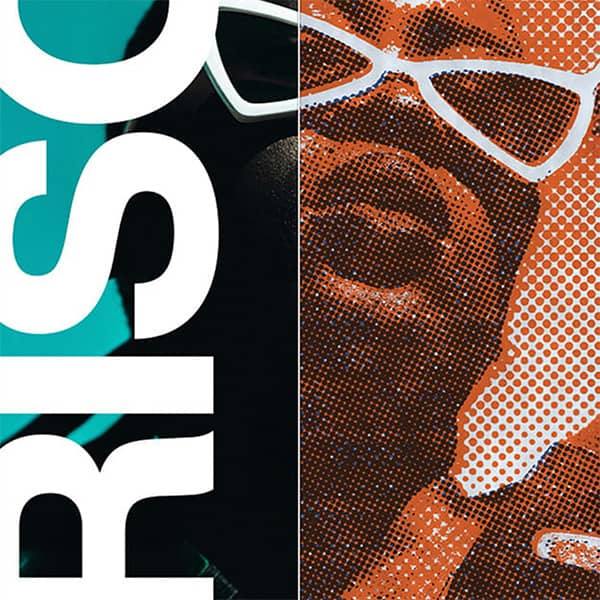
The technique was patented in the 1880s and made photographs printable in newspapers for the first time. Every printed image you saw before the 1990s was a halftone. It survives today as an aesthetic — pop art, punk flyers, risograph zines, streetwear graphics — precisely because it looks like something made rather than rendered.
Dot size carries the tone. Frequency (dots per inch) carries the detail. Angle stops the grid from reading as lines. Those three variables are the entire system.
Every generator is free to use. Exporting your own work needs a plan. Get the Effects Generator on its own from $12 / month, or the full suite with the Scene Editor, the 3D Editor and 251+ mockup templates.
Get a feel for the core features
No credit card required
Mockup & Effects Generator plan
Cancel anytime / Secure payment
Get a feel for the core features
No credit card required
Mockup & Texture Generator plan
Cancel anytime / Secure payment
Yes. Every halftone can be exported as a true vector SVG with each dot as an editable shape, so it scales to any size without losing quality. PNG export is also available for web, social and mockups.
No. The halftone generator runs entirely in your browser on desktop, tablet or phone. Nothing to download, no bitmap conversion, and a live preview while you adjust the settings.
45 degrees for single-colour work. A diagonal grid reads as texture to the human eye, while 0 or 90 degrees reads as visible lines. Rotate away from 45 only when you want that mechanical look deliberately.
Yes. Export as SVG so your separations stay sharp at output size, keep the dot size within what your mesh can hold, and raise ink density slightly to allow for dot gain on press.
It controls how much each dot spreads and gains weight, imitating real ink bleeding into paper. It is the setting that makes a halftone look printed rather than digitally generated.
A halftone reproduces a continuous-tone image using only solid dots of a single colour at varying sizes. Step back and your eye blends them into tones that were never actually printed. The technique was patented in the 1880s to make photographs printable in newspapers, and survives today as an aesthetic.
Yes. Every export on a paid plan carries a full commercial licence, with no watermarks and no per-use fees.
| Cookie | Duration | Description |
|---|---|---|
| cookielawinfo-checkbox-analytics | 11 months | This cookie is set by GDPR Cookie Consent plugin. The cookie is used to store the user consent for the cookies in the category "Analytics". |
| cookielawinfo-checkbox-functional | 11 months | The cookie is set by GDPR cookie consent to record the user consent for the cookies in the category "Functional". |
| cookielawinfo-checkbox-necessary | 11 months | This cookie is set by GDPR Cookie Consent plugin. The cookies is used to store the user consent for the cookies in the category "Necessary". |
| cookielawinfo-checkbox-others | 11 months | This cookie is set by GDPR Cookie Consent plugin. The cookie is used to store the user consent for the cookies in the category "Other. |
| cookielawinfo-checkbox-performance | 11 months | This cookie is set by GDPR Cookie Consent plugin. The cookie is used to store the user consent for the cookies in the category "Performance". |
| viewed_cookie_policy | 11 months | The cookie is set by the GDPR Cookie Consent plugin and is used to store whether or not user has consented to the use of cookies. It does not store any personal data. |
Get instant access to the Scene Editor and 3D Editor. No credit card required.
Scene Pro feature
Play with the sample image as much as you like. Scene and Effects Members can run the generators on their own artwork and export the finished file plus print-ready separations.
Explore my options Already a member? Log inView