Font Builder
Design your own typeface on a grid, shape every letter at once and download it as a working font. Included with Effects Pro and every plan with the Effects Generators.
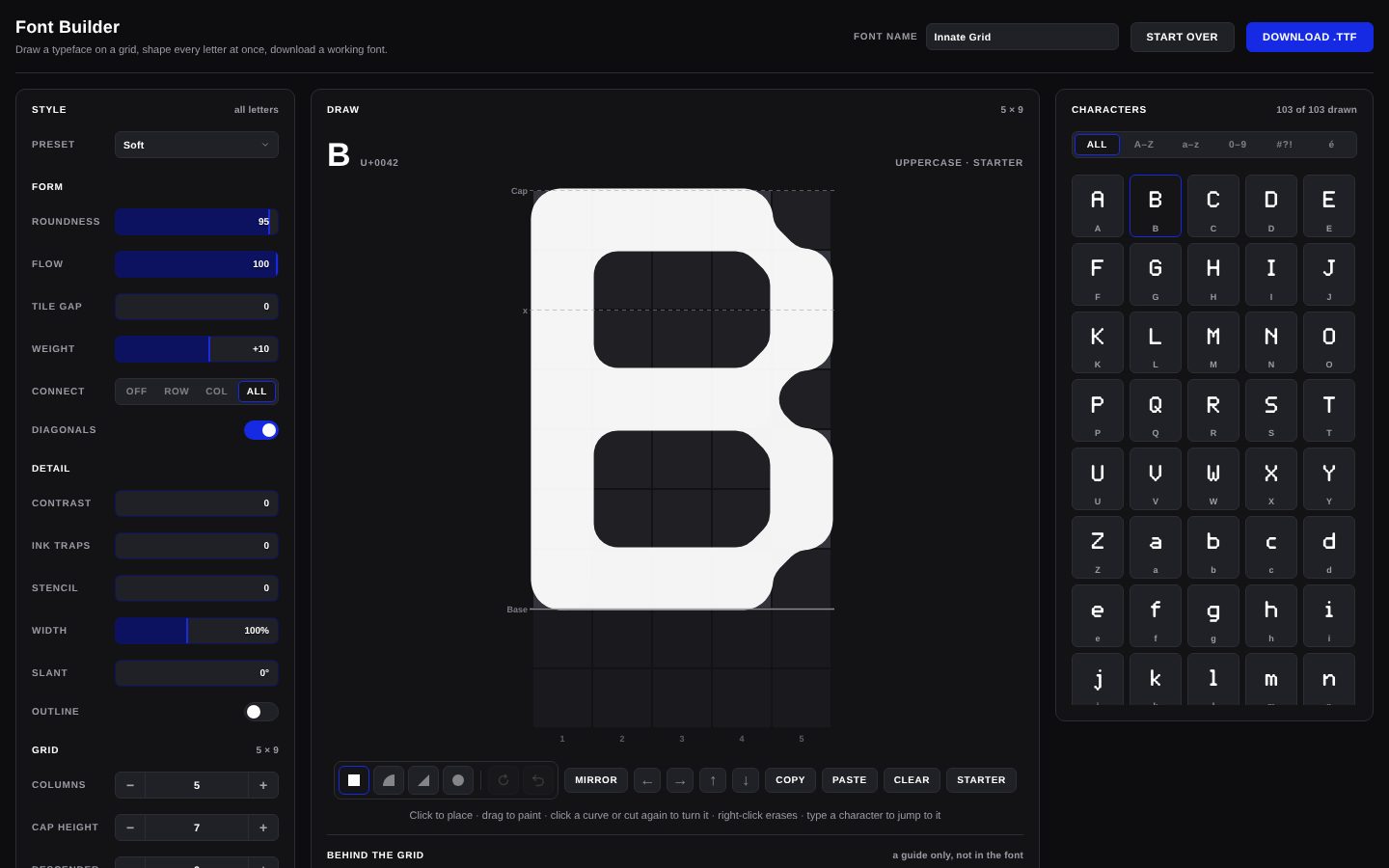
Explore my options Already a member? Log inStart with a preset. Soft, Block, Rounded, Dot matrix, Stencil and Outline each restyle every letter at once. Change any setting afterwards and it becomes Custom.
Form shapes the whole alphabet. Roundness rounds the corners of every tile, Flow controls how smoothly connected tiles run into one another, Tile gap opens space between them, and Weight makes every stroke heavier or lighter. Connect joins neighbouring tiles along rows, columns or both, and Diagonals lets them join corner to corner.
Detail refines it. Contrast makes horizontals thinner than verticals, the way pen-drawn type works. Ink traps cut notches into tight joins. Stencil breaks strokes with bridges. Width condenses or expands, Slant italicises, and Outline turns every letter into a line.
Grid sets the resolution. More columns and a taller cap height give finer detail; descender sets how far g, j, p, q and y drop. Letters you haven't touched are redrawn to fit the new grid, and letters you've drawn stay on the baseline.
Draw any character by clicking tiles on the grid. Mirror, nudge with the arrows, copy and paste between letters, or put the starter shape back. Upload an image behind the grid to trace a logo, a sketch or lettering you already have.
Spacing sets the letter gap and word space, or switches to Mono for a monospaced font. Kerning is automatic across 26,317 pairs, closing up awkward combinations like To, LT and r., and you can override any pair by hand.
Type into the proof to see your font live at any size, tracking and leading, on light or dark. Name it, then Download .TTF.
Most font makers hand you an empty grid per character and leave you to draw 100 of them before you have anything usable. That's where most homemade fonts get abandoned, somewhere around the letter K.
Here every character arrives already drawn: A–Z, a–z, 0–9, punctuation, symbols and accents. 163 characters, a usable font from the first second. The Form and Detail controls then reshape all of them together, so changing your mind about roundness or weight is one slider rather than an afternoon of redrawing.
Draw by hand only the letters that should be distinctive: the R with the long leg, the lowercase g with personality. Everything else follows the system.
A grid is how pixel fonts have always been made, so this is the natural home for them.
Because the result is a real TTF rather than an image of letters, it types and scales like any font, with no tracing or vectorising afterwards.
Stencil cuts bridges through the strokes so every counter would survive being cut from a sheet: military crates, spray-painted signage, utilitarian streetwear graphics. Push Stencil up for wider breaks, and pair it with Ink traps for a more engineered look.
Rounded and Soft take the opposite direction: friendly, bubbly, built for packaging and playful brands. High Roundness with Flow turned up makes connected strokes run together smoothly instead of reading as tiles.
Got a logo, a sketch or hand lettering you want as a real font? Upload it behind the grid, then fill tiles over it, letter by letter. The grid keeps everything on a consistent baseline and cap height, which is the part that's hard to get right by eye. The image stays in your browser and isn't uploaded.
Rounded and Soft take the opposite direction: friendly, bubbly, built for packaging and playful brands. High Roundness with Flow turned up makes connected strokes run together smoothly instead of reading as tiles.
Once you've downloaded the TTF, upload it in the Scene Editor text tool (Upload a font…) and set it on a hoodie or tee straight away. It's the quickest way to see whether a type idea works as merch before you take it further.
Prefer a finished typeface? Browse the Display Fonts in the store.
A font is more than its letter shapes. Three things decide whether it feels professional or homemade:
Prefer a finished typeface? Browse the Display Fonts in the store.
The Font Builder is included with Effects Pro and every plan with the Effects Generators. Get the Effects Generator on its own from $12 / month, or the full suite with the Scene Editor, the 3D Editor and 251+ mockup templates.
Get a feel for the core features
No credit card required
AI Scene & Video Studio
Cancel anytime / Secure payment
Get a feel for the core features
No credit card required
AI Scene & Video Studio
Cancel anytime / Secure payment
Yes. The Font Builder exports a real TrueType font file that installs on Mac and Windows and works in design software like any other font. Nothing needs installing to build it.
No. All 163 characters, including A to Z, a to z, numbers, punctuation, currency symbols and accents, start already drawn. The style controls reshape every letter at once, so you only draw by hand the characters you want to be distinctive.
TTF, the TrueType format. It is supported by macOS, Windows and the major design applications.
Yes. Kerning is automatic across 26,317 letter pairs, closing up awkward combinations such as To, LT and r followed by a full stop. You can override any individual pair by hand.
Yes. Start from the Block preset, set roundness and tile gap to zero and keep the grid small. The Dot matrix preset gives the separated-dot look of LED signs and receipt printers.
Yes. Upload an image behind the grid and trace it tile by tile. The grid keeps every letter on the same baseline and cap height. The image stays in your browser.
Yes. Download the TTF, then upload it in the Scene Editor text tool to set it on a garment straight away.
Yes. Fonts you build on a paid plan can be used in commercial work, with no per-use fees.
| Cookie | Duration | Description |
|---|---|---|
| cookielawinfo-checkbox-analytics | 11 months | This cookie is set by GDPR Cookie Consent plugin. The cookie is used to store the user consent for the cookies in the category "Analytics". |
| cookielawinfo-checkbox-functional | 11 months | The cookie is set by GDPR cookie consent to record the user consent for the cookies in the category "Functional". |
| cookielawinfo-checkbox-necessary | 11 months | This cookie is set by GDPR Cookie Consent plugin. The cookies is used to store the user consent for the cookies in the category "Necessary". |
| cookielawinfo-checkbox-others | 11 months | This cookie is set by GDPR Cookie Consent plugin. The cookie is used to store the user consent for the cookies in the category "Other. |
| cookielawinfo-checkbox-performance | 11 months | This cookie is set by GDPR Cookie Consent plugin. The cookie is used to store the user consent for the cookies in the category "Performance". |
| viewed_cookie_policy | 11 months | The cookie is set by the GDPR Cookie Consent plugin and is used to store whether or not user has consented to the use of cookies. It does not store any personal data. |
Get instant access to the Scene Editor and 3D Editor. No credit card required.
View